Blocklist Lookup: How to Check If a Domain or IP Is Blacklisted Published: 05 May, 2026
Introduction
Imagine spending months building a website, crafting quality content, and growing your audience — only to discover that your carefully written emails are ending up in spam folders, your website is being blocked by security software, or your pages are flagged with a security warning in browsers. In many cases, the culprit is not your content at all but rather a simple, invisible problem: your domain or IP address has been added to a blocklist.
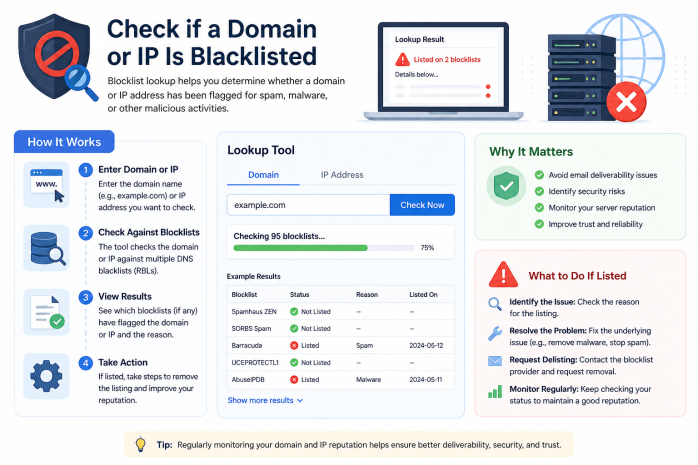
A Blocklist Lookup tool is your first line of defense and diagnosis in this situation. It checks your domain or IP address against dozens of the most authoritative spam, malware, and abuse databases in seconds, telling you whether you have a reputation problem and which specific lists you have been added to. Understanding blocklists — how they work, why you might end up on one, and how to get removed — is essential knowledge for anyone who manages a website or sends email online.
What Is a Blocklist?
A blocklist (also called a blacklist, DNSBL — DNS-Based Blackhole List — or RBL — Real-time Blackhole List) is a database of IP addresses, domains, or email addresses that have been identified as sources of spam, malware, phishing, or other abusive online behavior.
These lists are maintained by a variety of organizations:
- Anti-spam organizations that aggregate reports from email users and providers
- Security companies that track malicious domains and infrastructure
- Internet service providers that maintain internal lists based on observed abuse
- Government and law enforcement agencies in some jurisdictions
- Community-driven projects that rely on user reports
Blocklists are used by:
- Email servers to filter incoming messages and reject or quarantine spam
- Web browsers (via Google Safe Browsing, Microsoft SmartScreen, etc.) to warn users about dangerous sites
- Security software like antivirus programs and firewalls
- Web proxies and content filters in corporate and educational networks
- Advertising networks to prevent fraud
Why Might a Domain or IP End Up on a Blocklist?
Being listed on a blocklist is more common than many people realize, and the causes range from negligence to malicious hacking to simply sharing a server with a bad neighbor.
1. Sending Spam Emails
The most common reason for IP blacklisting is sending large volumes of unsolicited email. This can happen because:
- You sent a bulk email without proper opt-in consent
- Your email list contained too many invalid addresses (resulting in hard bounces)
- Your emails had a very high spam complaint rate (users clicking "Report Spam")
- You used a third-party email marketing service that was compromised or shared its IP with spammers
2. Malware or Phishing Content
If your website was hacked and is serving malware, fake login pages, or other phishing content, security databases will detect this and add your domain to their lists. This can happen even if you are completely unaware your site was compromised.
3. Shared Hosting Neighbors
On shared hosting servers, multiple websites share the same IP address. If even one of your neighbors on the server engages in spamming or malware distribution, the entire server's IP can be blacklisted — affecting every website on that server, including yours.
4. Open Relay Mail Server
An open relay is a mail server that is improperly configured to forward email from any source to any destination without authentication. Spammers actively scan the internet for open relays to exploit. If your mail server is discovered to be an open relay, it will be blacklisted almost immediately.
5. Compromised Accounts
If a user account on your hosting server is hacked — even a simple WordPress installation — attackers may use that account to send thousands of spam emails, causing your IP to be flagged.
6. Botnet Infection
If a device on your network is infected with malware and becomes part of a botnet, it may be sending spam or participating in cyberattacks, causing your IP to be listed.
7. Aggressive Scraping or Crawling
Some blocklists track IPs that engage in aggressive, automated scraping of websites without respecting robots.txt rules or rate limits. Excessive scraping can be treated as abusive behavior.
8. False Positives
Sometimes legitimate IP addresses and domains are listed by mistake. Over-aggressive spam filter algorithms can flag legitimate email senders, especially newer domains or small-volume senders with unestablished reputations.
Types of Blocklists
Not all blocklists are created equal. They vary in their focus, methodology, and the severity of their impact:
Email Blocklists (DNSBLs)
These are the most common type and focus on blocking spam emails. Major email blocklists include:
- Spamhaus ZEN (combines SBL, XBL, and PBL): One of the most widely used and respected spam blocklists. Being listed here has a significant negative impact on email deliverability.
- Spamhaus SBL (Spam Block List): Lists IPs that Spamhaus has confirmed send spam.
- Spamhaus XBL (Exploits Block List): Lists IPs of compromised devices sending spam, including botnet-infected machines.
- Spamhaus PBL (Policy Block List): Lists IP ranges that should not be sending email directly (typically residential and dynamic IP ranges assigned to end-users, not mail servers).
- Barracuda Reputation Block List (BRBL): Maintained by Barracuda Networks; heavily weighted in corporate email filtering.
- Sorbs (Spam and Open Relay Blocking System): Lists open relays, dial-up ranges, and known spam sources.
- MX Toolbox Blacklists: Aggregates checking across multiple lists.
Malware and Phishing Blocklists
These focus on domains and URLs serving malicious content:
- Google Safe Browsing: Used by Chrome, Firefox, and Safari to warn users about dangerous sites. A listing here triggers browser security warnings that dramatically reduce site traffic.
- Microsoft SmartScreen: Used in Edge browser and Windows Defender.
- Phishtank: A community-driven database of known phishing URLs.
- Malware Domain List: Tracks domains actively distributing malware.
- SURBL (Spam URI Real-time Blocklists): Checks URLs found in spam messages.
Web Filtering Blocklists
Used by corporate proxies, school networks, and parental control software:
- Websense / Forcepoint
- Cisco Umbrella (OpenDNS)
- Symantec Web Security
Botnet and Exploit Blocklists
- Emerging Threats: Tracks IPs associated with active threats, exploits, and attack traffic
- AbuseIPDB: Community-reported database of IPs involved in malicious activity
How Does a Blocklist Lookup Tool Work?
A blocklist lookup tool automates the process of checking a domain or IP address against multiple blocklists simultaneously. Here is the process:
Step 1: Input
You enter a domain name (e.g., example.com) or an IP address (e.g., 192.0.2.1) into the tool.
Step 2: IP Resolution (for Domain Lookups)
If you entered a domain name, the tool first resolves it to its IP address(es) using DNS. Some tools check both the domain name itself and all associated IPs.
Step 3: Multi-List Query
The tool queries each of the blocklists it covers. For DNS-based blocklists, this involves performing a reverse DNS lookup against the blocklist's special DNS zone. For example, to check if IP 192.0.2.1 is on a list hosted at dnsbl.example.net, the tool queries: 1.2.0.192.dnsbl.example.net. If a record exists, the IP is listed.
Step 4: Results Compilation
The tool compiles results from all queried lists and presents them in a clear format, showing which lists returned a positive (listed) result and which returned a negative (not listed) result.
Step 5: Additional Details
Better tools provide additional context, such as:
- The reason for the listing (spam, malware, botnet, etc.)
- A direct link to the blocklist provider's website for delisting information
- Historical listing data
- The severity or impact of being listed on each specific list
How to Interpret Blocklist Lookup Results
Not Listed (Clean)
If the tool shows that your domain/IP is not listed on any checked blocklists, this is a positive signal. However, keep in mind that no tool checks every blocklist in existence — there are hundreds of them. A clean result from a comprehensive tool means your reputation is in good standing across the major lists that matter most.
Listed on a Minor List
Some blocklists are obscure, poorly maintained, or known for excessive false positives. Being listed on a minor list that is rarely used may not have significant practical impact on your email deliverability or website reputation. Research the specific list to understand its weight and prevalence.
Listed on a Major List
Being listed on a major blocklist like Spamhaus or Google Safe Browsing has immediate, serious consequences:
- Spamhaus SBL listing: A significant percentage of email servers will reject your outgoing mail
- Google Safe Browsing listing: Chrome, Firefox, and Safari will display a large security warning to anyone trying to visit your website, dramatically reducing traffic
- Barracuda BRBL listing: Many corporate email filters will block your messages
These situations require immediate attention.
What to Do If You Are Blacklisted
Getting removed from a blocklist is possible, but the process varies by list. Here is a general approach:
Step 1: Identify All Active Listings
Use a comprehensive blocklist lookup tool to get a complete picture of every list you appear on.
Step 2: Investigate and Fix the Root Cause
Before requesting removal, you must identify and fix the underlying problem that caused the listing. Common remediation steps include:
- Spam issue: Audit your email sending practices, clean your mailing list, configure SPF/DKIM/DMARC records properly, switch to a reputable email service provider
- Malware/hacking: Scan your website with a security tool, remove all malicious code, update all plugins and CMS software, change all passwords, contact your hosting provider
- Open relay: Reconfigure your mail server to require authentication for email relay
- Botnet: Scan your network for infected devices, clean infections, and contact your ISP if needed
Requesting removal without fixing the root cause is pointless — you will likely be relisted quickly.
Step 3: Request Delisting
Most major blocklist operators provide a delisting form or process on their website. Key tips:
- Spamhaus: Visit spamhaus.org to check the reason for listing and follow their removal instructions. Removal from the SBL requires demonstrating that the spam issue has been resolved.
- Barracuda BRBL: Visit barracudacentral.org and submit a removal request.
- Google Safe Browsing: Use Google Search Console to request a malware or phishing review after cleaning your site.
- SORBS: Requires registration and a delisting request through their web interface.
Step 4: Monitor After Delisting
After being removed, monitor your listing status regularly for several weeks to ensure you do not get relisted due to a recurring or unresolved issue.
Step 5: Improve Your Practices Permanently
Implement long-term improvements to prevent future listings:
- Use proper email authentication (SPF, DKIM, DMARC)
- Keep all software and plugins updated
- Use strong, unique passwords for all accounts
- Implement web application firewall (WAF) protection
- Monitor your server logs for unusual activity
- Set up alerts for security events
Preventing Blacklisting: Best Practices
Prevention is far better than cure when it comes to blocklists:
For Email Senders
- Only send emails to people who have explicitly opted in
- Provide a clear, easy unsubscribe option in every email
- Monitor your bounce rates and spam complaint rates
- Use a dedicated sending IP if you send high volumes
- Implement and maintain proper SPF, DKIM, and DMARC records
- Warm up new sending IPs gradually rather than sending large volumes immediately
- Keep your email list clean by removing inactive subscribers
For Website Owners
- Keep all CMS software, themes, and plugins updated
- Use strong, unique passwords and two-factor authentication
- Install security plugins or web application firewalls
- Regularly scan your site for malware
- Monitor your hosting account for unusual file changes
- Use a reputable hosting provider with proactive security monitoring
For Network Administrators
- Ensure mail servers are not configured as open relays
- Monitor network traffic for unusual patterns that might indicate a compromised device
- Keep all networked devices patched and updated
- Use network-level spam filtering to prevent compromised internal devices from sending spam to the internet
Regular Blocklist Monitoring: Why It Matters
Many website owners and system administrators only check blocklists when they notice a problem — by which point the damage is already done. Regular, proactive monitoring is a much smarter approach.
Consider setting up a routine check — weekly or at minimum monthly — of your primary domain and sending IP addresses against major blocklists. Some tools offer automated monitoring with email alerts, notifying you immediately if you appear on any tracked list.
Early detection means:
- Smaller impact before the issue is resolved
- Faster delisting (some lists have faster turnaround for early responders)
- Better preservation of your email deliverability and website reputation
Conclusion
Blocklists are one of the internet's essential defense mechanisms against spam, malware, and abuse. But they are a double-edged sword — legitimate websites and email senders can find themselves caught in the crossfire through no direct fault of their own. Understanding how blocklists work, monitoring your reputation proactively, and knowing how to respond when you do get listed are critical skills for anyone managing an online presence.
A blocklist lookup tool is your instant, comprehensive window into how the internet's security infrastructure views your domain and IP addresses. Use it regularly, interpret the results intelligently, and take swift action when needed. Your email deliverability, your website's trustworthiness, and ultimately your online reputation depend on it.