Domain Location: How to Find Where a Website Is Physically Hosted Published: 05 May, 2026
Introduction
Every website on the internet is ultimately stored on a physical machine — a server sitting in a data center somewhere in the world. While the web feels like an invisible, borderless cloud, the infrastructure that powers it is very much real, physical, and geographically specific. A Domain Location tool allows you to discover exactly where in the world a website's server is physically located, providing insights that are valuable for business decisions, security research, performance analysis, and compliance requirements.
In this detailed guide, we will explain what domain location tools are, how they work, what the results mean, and why knowing the physical location of a web server matters more than most people realize.
What Is a Domain Location Tool?
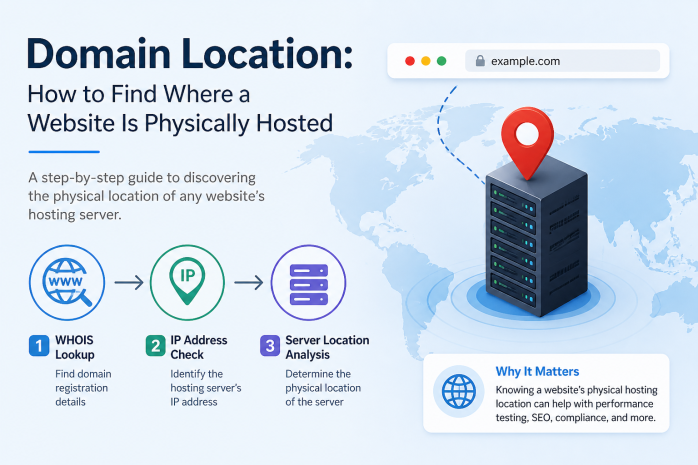
A Domain Location tool (also referred to as an IP Geolocation tool in technical contexts) determines the geographic location of the server or IP address associated with a given domain name. When you enter a domain name into such a tool, it:
- Resolves the domain to its IP address using DNS
- Queries one or more geolocation databases to find the physical location associated with that IP address
- Returns location data such as country, region, city, postal code, latitude, longitude, and sometimes even the internet service provider (ISP) or data center organization
The resulting information can pinpoint a server's location with varying degrees of precision — from the country level down to the city and even the neighborhood in some cases.
How IP Geolocation Works
IP geolocation is not a single technology but rather a combination of methods and data sources that together produce a geographic estimate for any given IP address.
Regional Internet Registry (RIR) Data
The internet's IP address space is managed by five Regional Internet Registries:
- ARIN (American Registry for Internet Numbers) — North America
- RIPE NCC (Réseaux IP Européens Network Coordination Centre) — Europe, Middle East, and Central Asia
- APNIC (Asia-Pacific Network Information Centre) — Asia-Pacific
- LACNIC (Latin America and Caribbean Network Information Centre) — Latin America and the Caribbean
- AFRINIC (African Network Information Centre) — Africa
When organizations are allocated IP address blocks by these registries, they provide information about where those addresses will be used. Geolocation databases draw heavily from this registry data.
BGP Routing Data
The Border Gateway Protocol (BGP) is the system that routers use to share routing information across the internet. Analyzing BGP routing announcements can reveal which networks are associated with which geographic regions, providing another data source for geolocation.
Active Measurements and Probing
Geolocation providers use active network probing — essentially measuring how long it takes for a signal to travel to and from an IP address — to estimate its physical distance from known reference points. Network latency is correlated with physical distance, providing a way to narrow down location estimates.
User-Contributed and Commercial Data
Many geolocation databases are enriched by commercial data, user submissions, and proprietary research. ISPs sometimes license their network topology information to geolocation providers, improving accuracy.
Wi-Fi and Mobile Location Data
For mobile and consumer IP addresses, geolocation may incorporate aggregated data from device location services, though this is less relevant for server-hosted domains.
What Information Does a Domain Location Tool Provide?
A typical domain location report includes:
- Country: The country where the server is located
- Region/State: The specific state or province
- City: The nearest city to the data center
- Postal Code: The postal or ZIP code of the area
- Latitude and Longitude: Precise geographic coordinates
- Time Zone: The UTC offset of the server's location
- ISP / Organization: The internet service provider or hosting organization that owns the IP block
- AS Number (ASN): The Autonomous System Number, which identifies the network that manages the IP block
- Map Visualization: Many tools display the location on an interactive map
Accuracy and Limitations of Domain Location Tools
IP geolocation is impressively accurate at the country level — typically achieving over 95?curacy for country determination. At the city level, accuracy drops significantly, often ranging from 50% to 80?pending on the IP type and database.
Several factors affect accuracy:
Anycast Routing
Some large services (like Cloudflare, Google's DNS, or major CDNs) use Anycast routing, where the same IP address is simultaneously active in multiple locations around the world. A geolocation query on an Anycast IP will return the location registered in the database, which may not be the location of the server that actually served your specific request.
VPN and Proxy Usage
If a website's traffic is routed through a VPN or proxy, the IP address seen by external observers may belong to a VPN endpoint in a completely different country from the actual server.
Data Center vs. Office IP
The IP geolocation reflects the IP address's registration and routing data, not necessarily where the human owner of the website is located. A company in Egypt might host their website on a server in Frankfurt, Germany.
Dynamic IP Address Pools
ISPs that use dynamic IP allocation may have IP addresses that move between locations over time. Geolocation databases may lag behind these changes.
IPv6 Adoption
IPv6 geolocation databases are generally less comprehensive than IPv4 databases, so accuracy for IPv6-hosted services may be lower.
Why Does Knowing a Server's Location Matter?
The geographic location of a web server has far-reaching implications across multiple domains of concern:
1. Website Performance and Latency
Network latency — the delay between a user's request and the server's response — increases with physical distance. A website hosted on a server in Los Angeles will generally respond faster for users in California than for users in Japan or South Africa. Understanding where a website's server is located helps explain performance characteristics:
- If your users are in Europe but your server is in the United States, they may experience slower load times
- Moving your server or using a CDN with edge locations near your users can dramatically improve performance
2. Legal and Compliance Considerations
Data privacy laws apply based on geographic jurisdictions. This makes server location critically important for legal compliance:
- GDPR (General Data Protection Regulation): Applies to personal data of EU residents. If you process EU residents' data, the location of your servers affects your compliance obligations.
- CCPA (California Consumer Privacy Act): Applies to California residents' data.
- Data Localization Laws: Some countries (Russia, China, India, and others) require certain types of data to be stored on servers physically located within their borders.
- Law Enforcement Access: Government agencies can compel hosting providers to surrender data. The jurisdiction in which a server is located determines which legal system has authority over that data.
3. Search Engine Optimization (SEO)
Server location can influence local SEO signals:
- Google uses the IP address of a server as one signal (among many) to determine a website's primary geographic target. A server in Germany may receive a slight ranking boost for German search queries.
- However, Google Search Console's International Targeting settings and proper use of hreflang tags are far more powerful signals than server location. Most SEO experts recommend using a CDN and focusing on content and technical SEO rather than server geography.
- Country Code TLDs (ccTLDs) are a stronger geographic signal than server location.
4. Cybersecurity and Threat Analysis
Security teams use domain location as part of threat assessment:
- Servers suddenly geolocating to unexpected countries may indicate domain hijacking or DNS manipulation
- Traffic analysis comparing the expected server location with actual request origins can detect anomalies
- Geolocation data helps categorize threats by geography, informing firewall rules and access control lists
5. Identifying Fraudulent Websites
A website claiming to be a local business in your country but hosted on a server halfway around the world is worth investigating further. This geographic inconsistency is sometimes a sign of a scam or fraudulent operation.
6. Content Availability and Geo-Restrictions
Domain location tools help users understand why certain content might be restricted:
- Streaming platforms, news sites, and other content providers often serve different content based on the user's location
- Understanding that a service is hosted in a particular country can explain why it is subject to regional availability rules
Domain Location vs. User Location
It is important to distinguish between two completely different concepts:
Server Location (what domain location tools find): The physical location of the server that hosts the website. This is what a domain location tool reveals.
User Location (IP geolocation of visitors): Where the people visiting a website are physically located. Websites use visitor IP geolocation for purposes like localized content, currency display, and analytics.
These two things are entirely separate. A website hosted in Ireland can have the majority of its visitors located in Brazil. Server location tools tell you about the hosting infrastructure, not the audience.
CDN and Domain Location: A Special Case
When a website uses a Content Delivery Network (CDN) like Cloudflare, AWS CloudFront, Fastly, or Akamai, the domain location tool's results reflect the CDN's edge node that is registered as the IP address owner — which may not correspond to where the original website's origin server is hosted.
CDNs work by distributing copies of your website across dozens or hundreds of data centers worldwide. When a visitor loads your site, they are served content from the nearest CDN node, not necessarily from your origin server. So:
- A domain location lookup on a Cloudflare-protected domain might show an IP registered in San Francisco (Cloudflare's headquarters location in databases) even if the origin server is in Singapore
- The actual IP geolocation returned may vary depending on which CDN edge node the tool queried
For sites using CDNs, domain location tools provide information about the CDN infrastructure, not the hosting location of the original website files.
Practical Use Cases for Domain Location Tools
Use Case 1: Diagnosing Website Performance Problems
A developer notices that a client's website is slow for visitors in Southeast Asia. Using a domain location tool, they confirm the server is in New York. They recommend adding a CDN with Asia-Pacific edge nodes to dramatically improve load times for that audience.
Use Case 2: Verifying a Business Claim
A customer receives an email claiming to be from a local UK-based online retailer. Using a domain location tool, they discover the website is hosted on a server in Eastern Europe, which contradicts the claimed local presence. This prompts further due diligence before making a purchase.
Use Case 3: Compliance Audit
A legal team conducting a data compliance audit uses domain location tools to verify that all web properties that process EU customer data are either hosted within the EU or through appropriate contractual frameworks with non-EU hosting providers.
Use Case 4: Security Incident Response
During a security incident, an analyst uses domain location data to identify that a suspicious domain recently changed its server from a US-based host to an IP geolocating to a known bulletproof hosting region. This confirms the domain is being used for malicious purposes and should be blocked.
Use Case 5: Competitive Intelligence
A marketing team uses domain location to determine that a competitor's website is hosted on premium infrastructure in multiple regions, suggesting significant investment in performance — which aligns with their apparent rapid growth strategy.
How Domain Location Interacts with Other Tools
Domain Location provides the most value when used as part of a broader research toolkit:
| Complementary Tool | How It Works with Domain Location |
|---|---|
| DNS Lookup | Reveals which DNS servers manage the domain and confirms the IP address used by the domain location tool |
| Reverse IP Lookup | After finding the server IP, reveals all other domains co-hosted on that server |
| WHOIS Information | Provides ownership and registration details that may explain or contextualize the server location |
| Blocklist Lookup | Checks whether the IP geolocated by domain location appears on any blocklists |
| Open Ports Lookup | Identifies what services are running on the located server |
Using these tools together creates a comprehensive profile of any domain's infrastructure, security posture, and legitimacy.
Conclusion
Domain Location tools bridge the gap between the abstract world of domain names and the very concrete, physical reality of global internet infrastructure. By revealing where in the world a website's server is located, these tools empower website owners, security researchers, compliance officers, and savvy internet users to make better-informed decisions.
From diagnosing performance issues to uncovering fraudulent operations, from regulatory compliance to competitive intelligence, understanding server geography adds a critical dimension to how we interact with and evaluate the websites we use every day. In an increasingly interconnected digital world, knowing where the internet physically lives is knowledge worth having.