Open Ports Lookup: Understanding What Services Are Running on a Server Published: 05 May, 2026
Introduction
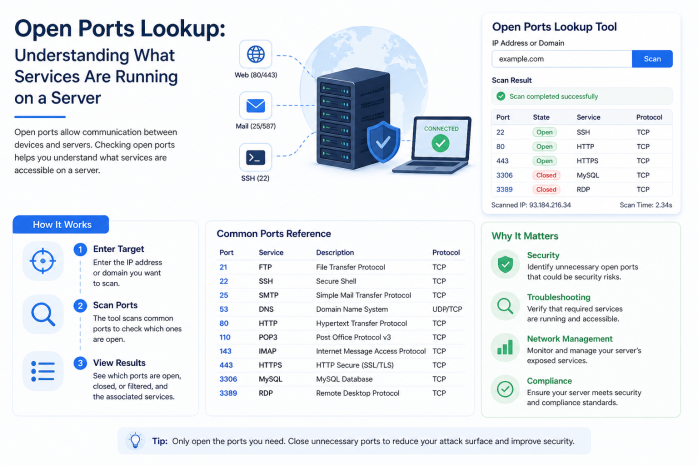
Beneath the familiar surface of websites and web applications lies a hidden layer of networked services communicating through specific numbered channels called ports. Every web server, mail server, database, and networked device uses ports to manage different types of traffic — and some of those ports, when left open and unprotected, become entry points for attackers. An Open Ports Lookup tool lets you see exactly which ports are accessible on any server, making it one of the most powerful utilities in both security analysis and network administration.
This comprehensive guide explains what network ports are, how they work, why some ports being open is normal while others being open is dangerous, and how open port lookup tools are used by security professionals, developers, and administrators to assess and improve the security posture of internet-facing servers.
What Is a Network Port?
In computer networking, a port is a logical communication endpoint that allows a single computer to handle multiple types of network traffic simultaneously. Think of it this way: if your server's IP address is like the mailing address of an apartment building, ports are like the individual apartment unit numbers — each type of service gets its own door.
Ports are identified by numbers ranging from 0 to 65535. These numbers are divided into three ranges:
Well-Known Ports (0–1023)
Also called system ports or privileged ports, these are reserved for widely used protocols and services. Assignment of these port numbers is managed by IANA (Internet Assigned Numbers Authority). Some of the most important ones include:
| Port | Protocol | Service |
|---|---|---|
| 20 | TCP | FTP (File Transfer - Data) |
| 21 | TCP | FTP (File Transfer - Control) |
| 22 | TCP | SSH (Secure Shell) |
| 23 | TCP | Telnet (Unencrypted remote login) |
| 25 | TCP | SMTP (Simple Mail Transfer Protocol) |
| 53 | TCP/UDP | DNS (Domain Name System) |
| 80 | TCP | HTTP (Web traffic, unencrypted) |
| 110 | TCP | POP3 (Email retrieval) |
| 143 | TCP | IMAP (Email retrieval) |
| 443 | TCP | HTTPS (Web traffic, encrypted) |
| 465 | TCP | SMTPS (Encrypted SMTP) |
| 587 | TCP | SMTP Submission |
| 993 | TCP | IMAPS (Encrypted IMAP) |
| 995 | TCP | POP3S (Encrypted POP3) |
Registered Ports (1024–49151)
These ports are assigned by IANA to specific applications and services upon request. Examples include:
| Port | Service |
|---|---|
| 1433 | Microsoft SQL Server |
| 1521 | Oracle Database |
| 3306 | MySQL/MariaDB |
| 3389 | RDP (Remote Desktop Protocol) |
| 5432 | PostgreSQL |
| 5900 | VNC (Virtual Network Computing) |
| 6379 | Redis |
| 8080 | HTTP Alternative / Proxy |
| 8443 | HTTPS Alternative |
| 27017 | MongoDB |
Dynamic/Private Ports (49152–65535)
These are not assigned to any specific service and are used dynamically by applications for temporary connections (ephemeral ports) or by custom applications.
TCP vs. UDP: The Two Main Transport Protocols
When you see port information in an open ports lookup, you will typically see each port associated with either TCP or UDP (or both). Understanding the difference is important:
TCP (Transmission Control Protocol)
TCP is a connection-oriented protocol that guarantees reliable, ordered delivery of data. Before any data is sent, TCP performs a three-way handshake (SYN, SYN-ACK, ACK) to establish a connection. TCP is used for services where data integrity is critical — web browsing (HTTP/HTTPS), email, and file transfer.
Key characteristic: If a packet is lost, TCP automatically retransmits it, ensuring all data arrives completely and in order.
UDP (User Datagram Protocol)
UDP is a connectionless protocol that prioritizes speed over reliability. It sends packets without establishing a connection first and does not guarantee delivery or order. UDP is used for services where speed is more important than perfect reliability — such as DNS lookups, video streaming, VoIP calls, and online gaming.
Key characteristic: UDP is faster but will simply drop lost packets rather than retransmitting them.
Port States
When a port scan or open ports lookup checks a port, it can return one of three states:
- Open: The port is actively listening and accepting connections. A service is running on this port.
- Closed: The port is reachable (the host responds) but no service is currently listening on it.
- Filtered: A firewall or filtering device is preventing the probe from reaching the port. The probe receives no response or an ICMP unreachable message.
What Is an Open Ports Lookup Tool?
An Open Ports Lookup tool (also called a Port Scanner or Port Checker) is a utility that probes a remote server to determine which ports are open and responding to connections. By sending network packets to specific port numbers and analyzing the responses, the tool builds a picture of which services are accessible on the target server.
Open ports lookup tools can operate in two main ways:
External/Remote Scanning
The tool sends probes from its own servers to the target IP address or domain, just as a remote attacker would. This gives a true picture of what is visible from the public internet — which is the most important perspective from a security standpoint.
Internal Scanning
Running a scan from inside the target network provides information about what is accessible to internal users, which may differ from what is visible externally due to firewall rules.
For web-based open ports lookup tools (like those on your website), the scanning is performed externally, showing exactly what an outside observer can see.
How Port Scanning Works
Port scanning techniques vary in their approach, speed, and detectability:
TCP Connect Scan (Full Open Scan)
The most straightforward method — it completes the full TCP three-way handshake for each port being tested. If the handshake completes, the port is open. This method is accurate but easily logged by the target.
TCP SYN Scan (Half-Open Scan)
Often called a "stealth scan," this technique sends a SYN packet (the first step of the handshake) and waits for a response:
- SYN-ACK response = port is open
- RST response = port is closed
- No response = port is filtered
The scan then sends a RST packet to tear down the half-open connection without completing the handshake. This is faster and generates less log noise.
UDP Scan
UDP scanning is more complex because UDP does not perform a handshake. The scanner sends a UDP packet to the target port:
- If the port is open and the service recognizes the probe, it may respond
- If the port is closed, the host typically sends an ICMP "Port Unreachable" message
- If the port is filtered, there is no response
Version Detection
Advanced port scanning includes sending service-specific probes to open ports to identify exactly which software and version is running. This is important for vulnerability assessment — knowing that port 22 is open is useful, but knowing it is running OpenSSH 7.4 (which has known vulnerabilities) is far more actionable.
Interpreting Open Ports Lookup Results
When you run an open ports lookup, interpreting the results requires context. Here are key considerations:
Expected Open Ports for a Web Server
A standard web server should have these ports open:
- Port 80 (HTTP): For unencrypted web traffic (should redirect to HTTPS)
- Port 443 (HTTPS): For encrypted web traffic — this should always be present
- Port 22 (SSH): For administrator remote access — this is expected but should be secured
Everything else should ideally be closed or filtered, especially from the public internet.
Expected Open Ports for a Mail Server
A dedicated mail server might additionally have:
- Port 25 (SMTP): For receiving email from other mail servers
- Port 465 or 587: For authenticated email submission from clients
- Port 993 (IMAPS): For encrypted IMAP email retrieval
- Port 995 (POP3S): For encrypted POP3 email retrieval
Ports That Should Almost Never Be Open to the Internet
Some ports being open to the public internet is a significant security concern:
- Port 23 (Telnet): Transmits data in plain text. Telnet should never be used — use SSH instead.
- Port 3389 (RDP): Remote Desktop Protocol is frequently targeted by brute-force attacks and ransomware. Should be restricted by firewall rules to specific IP addresses.
- Port 3306 (MySQL) / 5432 (PostgreSQL): Database ports should never be publicly accessible. These should be restricted to local connections or specific application server IPs.
- Port 27017 (MongoDB): MongoDB instances left open to the internet have been involved in numerous mass data theft incidents.
- Port 6379 (Redis): Redis databases with no authentication exposed to the internet are a critical vulnerability.
- Port 445 (SMB - Server Message Block): Associated with Windows file sharing and famously exploited by ransomware like WannaCry. Should never be exposed to the public internet.
Why Is Open Port Monitoring Important?
Security Risk Reduction
Every open port is a potential attack surface. The fewer ports exposed to the internet, the smaller your attack surface. Regular port scanning of your own infrastructure helps you:
- Discover services that should not be publicly accessible
- Identify unauthorized services that may have been installed by malware
- Verify that firewall rules are working as intended
- Find legacy services that were enabled temporarily and never disabled
Compliance Requirements
Many security standards and frameworks require regular port scanning and service inventory as part of their controls:
- PCI DSS (Payment Card Industry Data Security Standard): Requires regular network scans and minimizing open ports
- HIPAA: Requires risk assessments that include network service exposure
- ISO 27001: Requires systematic management of network services and access controls
Server Hardening
Server hardening is the process of reducing a system's attack surface by eliminating unnecessary services, closing unused ports, and configuring security settings optimally. Port scanning is both the first step (establishing a baseline) and an ongoing verification tool in the hardening process.
Change Management and Audit
In managed environments, tracking which ports are open provides a baseline that can detect unauthorized changes. If a new port appears in a scan that was not there before, it warrants immediate investigation.
Open Ports and Firewalls: How They Work Together
A firewall is the primary tool for controlling which ports are accessible from the internet. Firewalls operate by examining incoming network traffic and either allowing or blocking it based on a set of rules.
Stateful Firewall Rules
Modern firewalls maintain state tables that track active connections. They allow:
- Incoming connections to explicitly permitted ports (e.g., 80 and 443)
- Return traffic for established outgoing connections
- And block everything else by default
Common Firewall Mistakes That Expose Ports
- Overly permissive rules: Rules that allow entire IP ranges or all ports instead of specific needed ports
- Rule order errors: Firewall rules are evaluated in order; a permissive rule early in the chain can override a restrictive rule later
- Application-level bypasses: Applications that punch through firewalls using common allowed ports (e.g., tunneling over port 80)
- Firewall disabled for troubleshooting and never re-enabled: One of the most common causes of unexpected open ports
An open ports lookup essentially shows you the result of your firewall configuration from the perspective of the public internet — a critical reality check.
Port Scanning from an Attacker's Perspective
Understanding how attackers use port scanning helps defenders think strategically about security:
Reconnaissance Phase
Port scanning is a fundamental step in almost every cyberattack. Attackers use it to identify:
- What services are running and which might be vulnerable
- Which software versions are in use (via banner grabbing and version detection)
- What operating system the server is running
- Potential misconfigurations
Automated Attack Tools
Many attack tools automatically scan large ranges of IP addresses looking for specific vulnerable ports. For example:
- Scanning for open port 3389 looking for unpatched RDP servers to exploit
- Scanning for open port 27017 looking for MongoDB databases with no authentication
- Scanning for open port 22 looking for servers with weak or default passwords to brute-force
This automated scanning happens continuously across the entire internet. Your server is being scanned by automated tools right now — the question is what those scanners find.
Reducing the Attack Surface
Every port you close that does not need to be open is a vulnerability that attackers cannot exploit. Principle of least privilege applied to network services means: only expose what is absolutely necessary, to the minimum necessary audience.
Practical Recommendations for Different User Types
For Individual Website Owners
- Use a hosting provider with firewall protection enabled by default
- Verify that only ports 80 and 443 are open to the public (plus 22 if you manage the server via SSH)
- Use a web application firewall (WAF) service for additional protection
- Regularly run an open ports lookup on your domain to verify your exposure
For Small Business Owners
- Hire a qualified system administrator or security professional to audit your server configuration
- Ensure database servers are never directly accessible from the internet
- Use VPNs for administrative access rather than exposing management ports publicly
- Document all intended open ports and review the list quarterly
For Developers
- Never leave development servers or services accessible on the public internet
- Use private networks and VPNs for internal services
- Practice the principle of least privilege: run each service on the minimum necessary network interface
- Include port exposure review as part of your deployment checklist
For Security Professionals
- Maintain documented port baselines for all managed systems
- Set up automated scanning to alert on new open ports
- Use open ports data as one input in regular risk assessments
- Combine port scanning with vulnerability scanning for comprehensive assessment
Open Ports Lookup as Part of a Comprehensive Security Assessment
Open ports lookup provides a crucial data point, but it works best as part of a broader security toolkit:
| Tool | Complementary Role |
|---|---|
| DNS Lookup | Reveals all services configured at the DNS level |
| Reverse IP Lookup | Identifies all co-hosted domains that share the same exposed ports |
| WHOIS Information | Identifies ownership and contact information for the server IP |
| Blocklist Lookup | Checks if the IP is already flagged for abuse |
| Domain Location | Confirms the physical location of the server running these services |
| SSL Certificate Check | Verifies that HTTPS-protected services use valid, current certificates |
Using all these tools together creates a comprehensive picture of a server's security posture, connectivity, and reputation.
Conclusion
Open Ports Lookup is one of the most direct and revealing tools available for understanding what services are exposed on any internet-connected server. In a world where automated attack tools continuously scan the internet looking for vulnerable, exposed services, knowing exactly what your server's ports look like from the outside is not optional — it is a fundamental security responsibility.
Whether you are a website owner doing a quick security check, a developer verifying your deployment configuration, or a security professional conducting a formal audit, understanding open ports and how to interpret scanning results gives you the knowledge needed to reduce risk, maintain compliance, and protect your online infrastructure from the constant threats that characterize the modern internet.
Run a port check today. Know your exposure. Close what does not need to be open. Your server's security depends on it.